Ajax KeyPad Black SMART
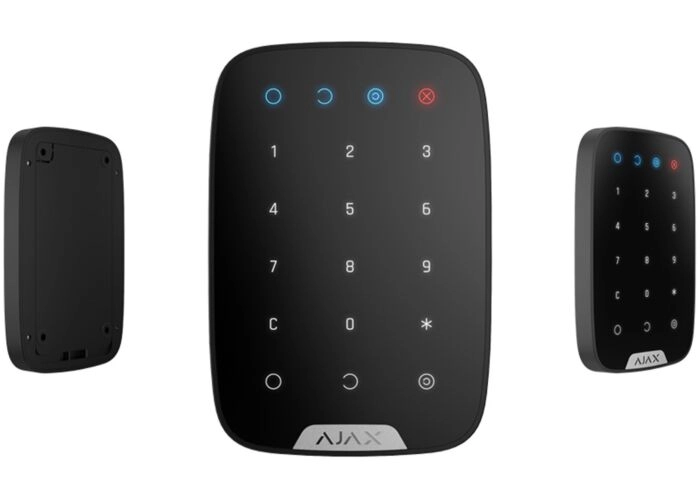
Ajax KeyPad Black SMART
- Customers rate us 8.6 based on 806 reviews
- Experienced customer service and 2 year warranty
- Specialist since 2007. Member of Thuiswinkel Waarborg


Specifications: Ajax KeyPad Black SMART
| SKU | 7161 |
|---|




The black Ajax KeyPad is a wireless control panel that allows you to easily arm and disarm the Ajax SMART alarm system. This can be done with a single button press or by entering a personal access code. The keypad is ideal for installation at the entrance, allowing residents or employees to operate the alarm system without a smartphone.
Using the Ajax app, you can connect the KeyPad to the Ajax Hub and configure features like user codes, entry delays, and notifications. The clear LED status indicator lets you see at a glance whether the alarm system is armed.

Operate with code and clear status display
The Ajax KeyPad uses touch buttons and bright LED indicators. Users can arm and disarm the alarm system with a personal code. Depending on the hub's settings, partial arming is also possible, for example, for nighttime security while you're still inside.
After multiple incorrect attempts, the keypad can automatically lock temporarily. This prevents misuse and increases security without making it difficult for authorized personnel to use.
Duress code and silent alarm notification
The KeyPad supports a duress code. This special code makes the system appear to disarm normally, while a silent alarm is sent in the background. This message can be sent to designated users and, if the system is connected to an alarm receiving center, to an alarm receiving center.
Always check whether and how the use of this function fits within your application and the regulations in the country in which you use the system.
Difference between KeyPad Plus and KeyPad Combi
The standard Ajax KeyPad is designed for code operation. If you also want to use cards or tags (RFID), the KeyPad Plus is a better choice. If you're looking for a combination of multiple control methods in a single device, the KeyPad Combi is a better fit.
Wireless communication and installation
The KeyPad communicates wirelessly with the Ajax Hub via the secure Jeweller protocol. This connection is encrypted and continuously monitored for range, interference, and tampering. Jamming detection alerts you to any attempts to disrupt the signal.
Power is provided by four AAA batteries. With normal use, these will last for about two years, and you'll receive a prompt notification when replacements are needed.
Key Features
– Wireless keypad / code panel for Ajax alarm systems
– Switch on and off with a code or one push of a button
– Support for duress code with silent alarm notification
– Automatic blocking after multiple incorrect attempts
– Bright LED status indication
– Secure Jeweller communication with jamming detection
Technical specifications
– Use: indoor
– Power: 4 × AAA batteries
– Battery life: up to approximately 2 years (depending on use and settings)
– Communication range: up to 1700 meters in open field, without obstacles
– Temperature range: -10 °C to +40 °C
– Dimensions: 150 × 103 × 14 mm
– Weight: approx. 197 g
Package contents
– 1 × Ajax KeyPad – black SMART
- Mounting material
- Manual
Buy Ajax KeyPad at Sitcon
Sitcon has specialized in professional security solutions since 2007. All Ajax products are internally tested for quality, reliability, and compatibility. You can find advice and support at our stores in Nieuwegein and Maaseik. Sitcon is a member of Thuiswinkel Waarborg.
Frequently asked questions about the Ajax KeyPad
Can I use the Ajax KeyPad without a smartphone?
Yes, the KeyPad works independently once paired with the Ajax Hub. You use the Ajax app to set codes and user permissions, but daily operation is handled entirely through the keypad.
What is a duress code and what do I use it for?
A duress code is a special code that allows you to switch off the alarm system in the normal way, while a silent alarm message is sent in the background to configured recipients or an alarm receiving center.
What is the difference between the black and white Ajax KeyPad?
Functionally, both versions are identical. The only difference is the color, allowing you to better match the keypad to your interior or the color of your doors and walls.
Where is the best place to place the Ajax KeyPad?
The keypad is usually placed at the main entrance, in a location where users can use the entry delay and easily enter a code. It's best not to place it directly visible from outside.
What happens if there are multiple incorrect codes?
After multiple incorrect attempts, the Ajax KeyPad can automatically lock temporarily. This reduces the risk of misuse and increases the overall security of the system.

Order now: